Download Devil May Cry 3 For Nethersx2
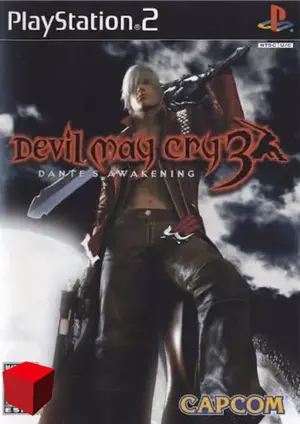
Devil May Cry 3 Introduction
Devil May Cry 3 on NetherSX2 brings stylish demon-hunting to your phone — smooth on flagships, very playable on mid-range with small tweaks.
Capcom’s 2005 action classic set the bar for stylish combat with its Style system. Fast, combo-driven gameplay rewards a controller and stable FPS.
| Detail | Info |
|---|---|
| Title | Devil May Cry 3 |
| Genre | Action |
| Released | 2005 · Capcom |
| NetherSX2 compatibility | Good |
| Recommended format | ISO (or CHD to save space) |
| Recommended build | NetherSX2 4248 (Patch) |
Best NetherSX2 Settings for Devil May Cry 3
Apply these in the game’s per-game settings so your global setup stays untouched:
Renderer
Vulkan recommended for consistent combat frame rates.
Resolution
1x on mid-range; flagships can push 2x for sharper style meters.
Speed
Multi-threaded VU on; EE underclock -1 helps weaker phones in crowded rooms.
Controls
A controller transforms the experience — style-switching needs real buttons.
How to Play Devil May Cry 3 on NetherSX2
- Install NetherSX2 — download the Patch or Classic build and install the APK.
- Import your Ps2 BIOS — dump it from your own PS2; the region must match your game.
- Add your Devil May Cry 3 file — dump the disc you own to ISO or CHD and place it in your games folder.
- Apply the settings above — create a per-game profile so other games are unaffected.
- Launch and play — select Devil May Cry 3 from the game list and enjoy.
Legal note: only play games you own — dump your discs from your own PlayStation 2 collection.
Common Devil May Cry 3 Issues & Fixes
Crowded-room slowdown
Cause: Many enemies + effects.
Fix: 1x resolution and underclock -1 smooth out the busiest fights.
Style text flicker
Cause: HUD rendering edge case.
Fix: Toggle Blending Accuracy or switch renderers.
Timing feels off
Cause: Unstable frame pacing.
Fix: Enable frame limiting and close background apps.
Devil May Cry 3 on NetherSX2 — FAQ
Ready to Play Devil May Cry 3?
Get NetherSX2 on your Android phone, apply the settings above, and jump into Devil May Cry 3 — one of the best PS2 experiences you can carry in your pocket.